Table of Contents
Emby is a self-hosted media server — think personal Netflix. With hardware transcoding enabled, your NVIDIA GPU handles video encoding/decoding on the fly, meaning you can serve 3–5 simultaneous 4K streams with nearly zero CPU usage.
The setup we use here: Emby runs as a Docker container on a Linux host (Arch Linux VM on KVM, or Unraid directly), with the NVIDIA GPU passed through from the hypervisor. The media library is stored on a NAS (ODIN via NFS) and mounted into the container.
The host OS needs NVIDIA drivers installed before Docker can access the GPU.
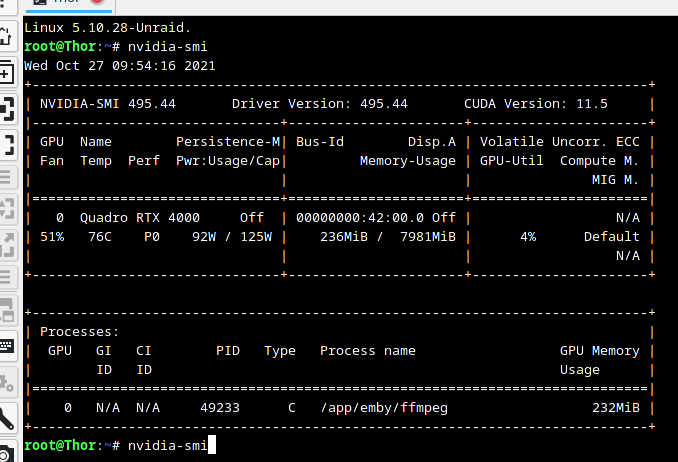
You should see output showing your GPU model, driver version, and CUDA version. If the GPU is passed through from a hypervisor (bhyve, KVM, XCP-NG), install drivers inside the VM — the host doesn't need them.
The NVIDIA Container Toolkit allows Docker containers to use the host GPU.
NVIDIA_VISIBLE_DEVICES=all environment variable exposes all GPUs to the container. Use a specific GPU ID (GPU-4d31ca78-...) to pin to one GPU when multiple are present.-
1
Open Emby Admin Dashboard
Navigate to
http://<emby-ip>:8096, complete setup wizard, then go to Admin Dashboard → Playback → Transcoding. -
2
Enable Hardware Acceleration
Set Hardware Acceleration to NVIDIA NVENC. Emby will detect your GPU automatically if the NVIDIA runtime is configured correctly.
-
3
Enable Hardware Decoding
Check Enable hardware decoding for H264, H265/HEVC, and VP9. This offloads video decode (not just encode) to the GPU — critical for 4K HEVC content.
Pre-converting your library to a compatible format (H.264, 8Mbps for movies, 4Mbps for TV) eliminates transcoding entirely — clients can direct play. This is especially useful for older clients that can't handle HEVC.
-
1
Install HandBrakeCLI
apt install handbrake-cli # or on Unraid: install via Community Apps -
2
Batch Convert a Directory
Convert all MKV files in a directory to H.264 MP4:
for f in /media/movies/*.mkv; do HandBrakeCLI -i "$f" -o "${f%.mkv}.mp4" \ --preset="Fast 1080p30" \ --vb 8000 \ # 8Mbps for movies --encoder nvenc_h264 \ # use NVIDIA GPU --aencoder av_aac done -
3
Use NZBGET Categories for Auto-Convert
If using NZBGet for downloads, configure post-processing categories to automatically trigger HandBrakeCLI on completed downloads — different bitrates for TV vs movies.
mediainfo --Output=CSV /media/movies/*.mkv | grep -E "HEVC|VC-1". You can script this to generate a report and batch-convert only the incompatible files.Test from multiple client types to confirm direct play and transcoding quality:
watch.yourdomain.com) pointing to the internal Emby port. Use DNS-only mode in Cloudflare — Cloudflare's proxy explicitly prohibits video streaming through their network and will throttle or block the traffic.| Client | Expected Behavior |
|---|---|
| Emby mobile (iOS/Android) | Direct play H.264, transcode HEVC on cellular |
| Roku | 1080p direct play H.264, transcode 4K content |
| LG / Samsung TV | Direct play most formats; HDR passthrough if supported |
| Chrome / Edge browser | H.264 direct; HEVC transcode (no native browser HEVC) |
Monitor the Emby Dashboard during streaming to confirm GPU is being used (CPU usage should stay below 10% during transcode sessions).
On Unraid, GPU passthrough to Docker is handled differently:
-
1
Install NVIDIA Plugin
In Unraid: Community Apps → search "NVIDIA" → install Unraid NVIDIA plugin by ich777. This adds NVIDIA driver support to Unraid's kernel.
-
2
Configure Emby Container
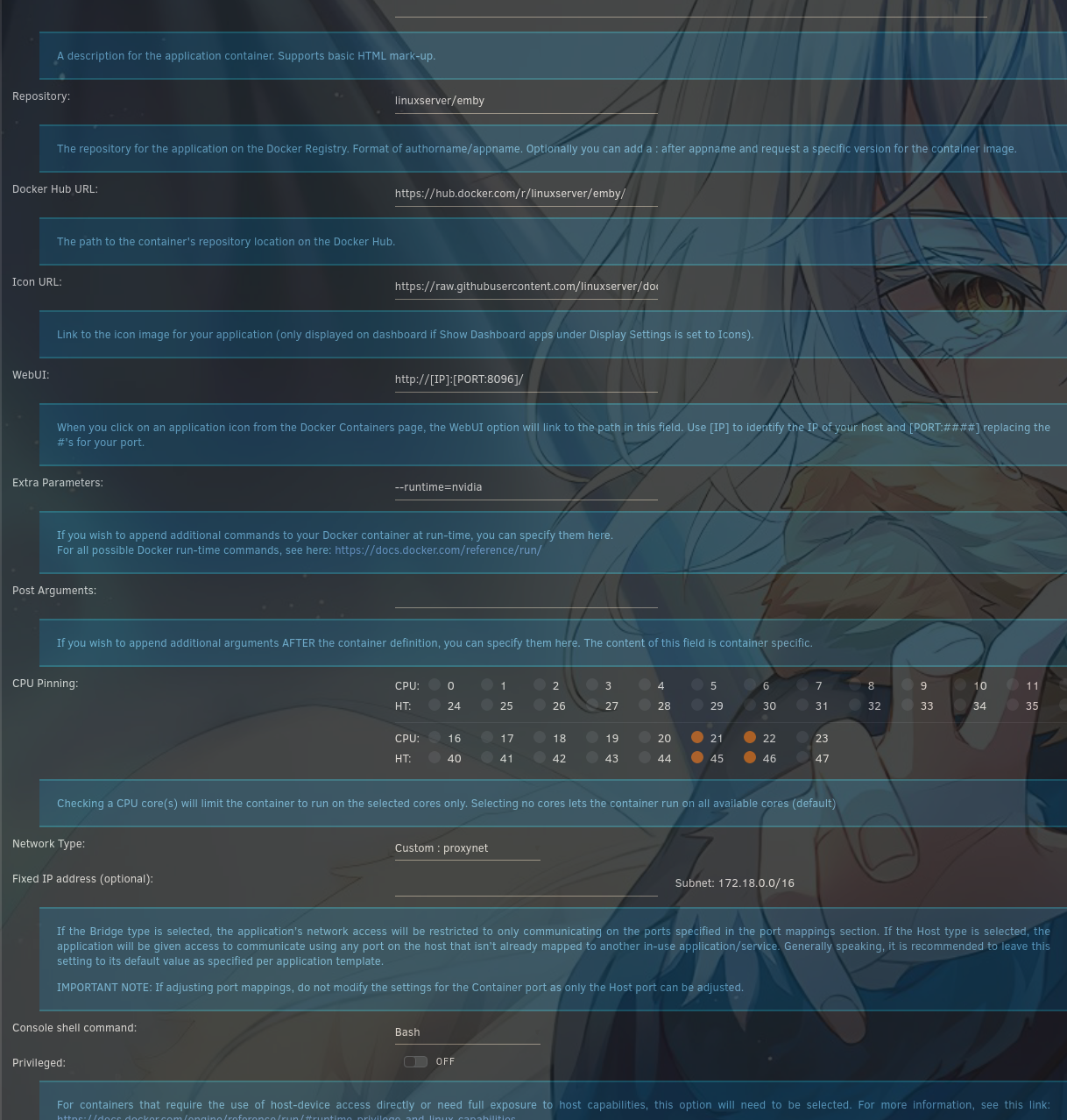
In the Emby Docker template in Unraid, add an extra parameter in the Extra Parameters field:
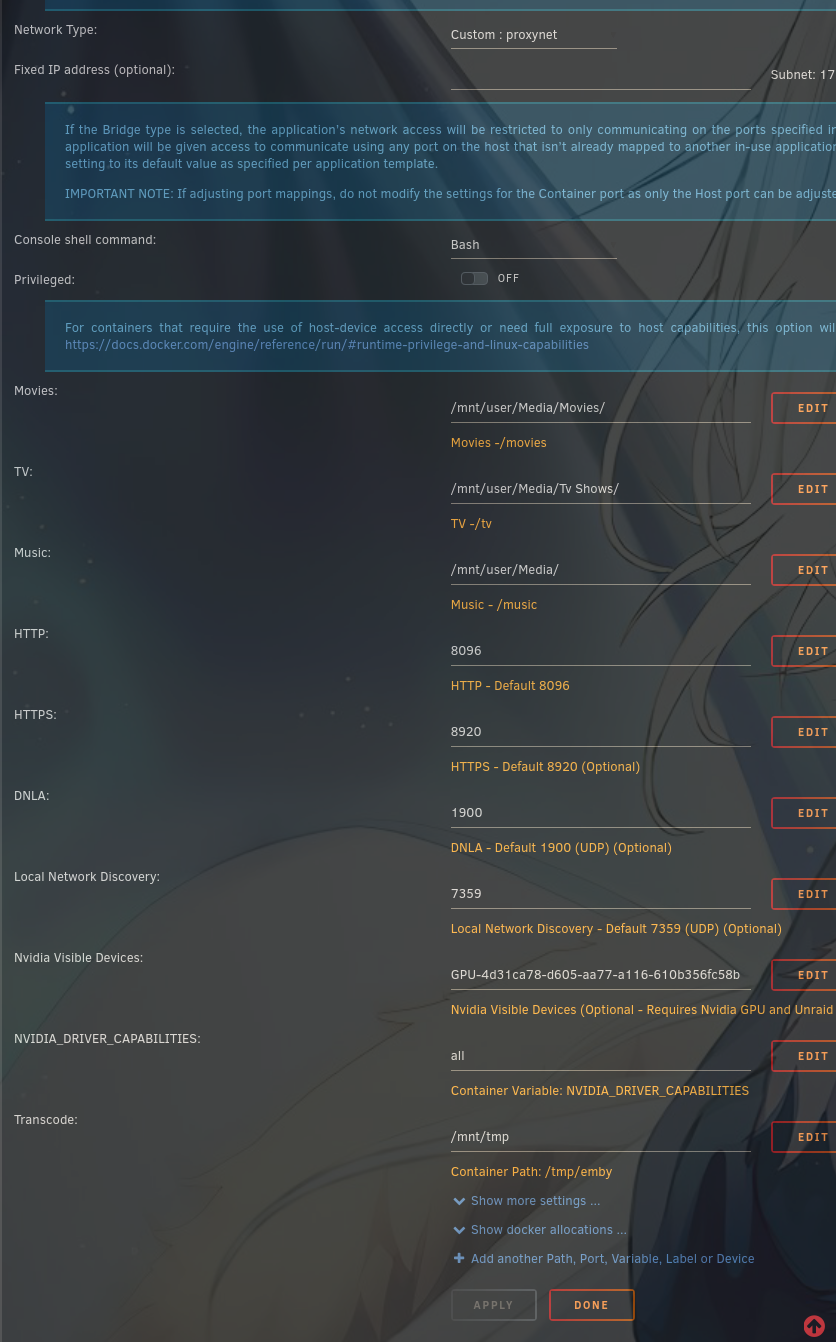
--runtime=nvidiaAdd environment variables:
NVIDIA_VISIBLE_DEVICES=GPU-4d31ca78-d605-aa77-a116-610b356fc58b NVIDIA_DRIVER_CAPABILITIES=allThe GPU ID is unique to your hardware — find it with
nvidia-smi -Lfrom the Unraid terminal.
- Emby Hardware Acceleration Forum Community discussion on GPU transcoding setup
- MediaInfo on Linux Inspect media file properties — shared in HomeLab Discord #media-servers
- NVIDIA Container Toolkit Docs Official NVIDIA Docker runtime installation guide