Table of Contents
Nginx Proxy Manager (NPM) is a Docker-based web UI for managing an Nginx reverse proxy. It handles SSL certificate issuance and renewal automatically, routes traffic to your backend services by hostname, and supports advanced Nginx config snippets without requiring you to write raw config files.
The core use case: you have multiple services running on your homelab (Plex on port 32400, Portainer on 9443, Jellyfin on 8096, etc.) and you want them all accessible via clean HTTPS URLs like plex.yourdomain.com, portainer.yourdomain.com — all with valid SSL certs.
- Docker and Docker Compose installed on a Linux host (or Unraid/Proxmox LXC)
- A domain name pointed to your server's public IP (A record or Cloudflare proxy)
- Ports 80 and 443 forwarded from your router to the NPM host
- (Optional but recommended) Cloudflare API token for DNS-01 challenge wildcards
Create a directory for NPM and add a docker-compose.yml file:
Then start it:
-
1
Open the Admin UI
Navigate to
http://<your-server-ip>:81in your browser. Give it a minute to initialize on first launch. -
2
Login with Default Credentials
Email:
admin@example.com/ Password:changeme -
3
Change Your Credentials Immediately
NPM will prompt you to set a new email and password. Do this before adding any proxy hosts.
A wildcard cert (*.yourdomain.com) covers all subdomains with one certificate. This requires the DNS-01 challenge — Cloudflare makes this easy.
-
1
Get a Cloudflare API Token
In Cloudflare dashboard → My Profile → API Tokens → Create Token. Use the "Edit zone DNS" template and scope it to your specific zone (domain).
-
2
Add SSL Certificate in NPM
In NPM → SSL Certificates → Add SSL Certificate → Let's Encrypt. Enter your domain as
*.yourdomain.comand alsoyourdomain.com. Select Cloudflare DNS as the challenge type and enter your API token. -
3
Wait for Issuance
Let's Encrypt will create a DNS TXT record in Cloudflare to prove domain ownership, then issue the cert. This usually takes 30–60 seconds. Once issued, the cert auto-renews.
A proxy host maps a hostname to a backend service. For example: plex.yourdomain.com → http://10.10.10.5:32400
-
1
Hosts → Add Proxy Host
In NPM, go to Proxy Hosts and click Add Proxy Host.
-
2
Fill in Domain & Forward Info
Domain Names:
service.yourdomain.com
Forward Hostname/IP: your service's local IP
Forward Port: the service's port
Enable Block Common Exploits and Websockets Support if needed. -
3
Assign SSL Certificate
On the SSL tab, select your wildcard certificate. Enable Force SSL to redirect all HTTP traffic to HTTPS, and enable HTTP/2 Support.

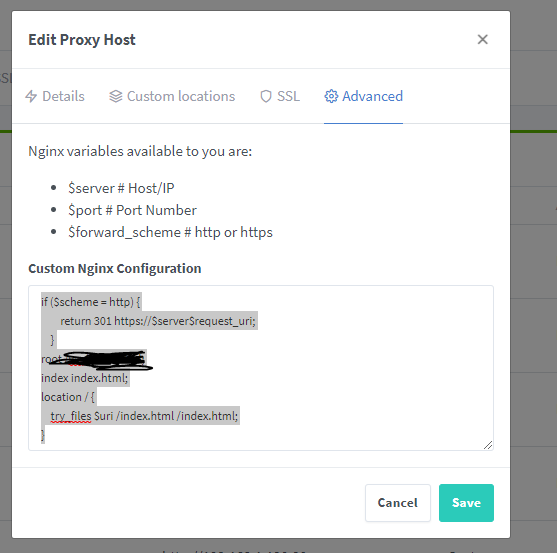
To serve a static HTML site via NPM (rather than proxying to a backend container), mount your files into the NPM container and configure the location root in the Advanced tab.
-
1
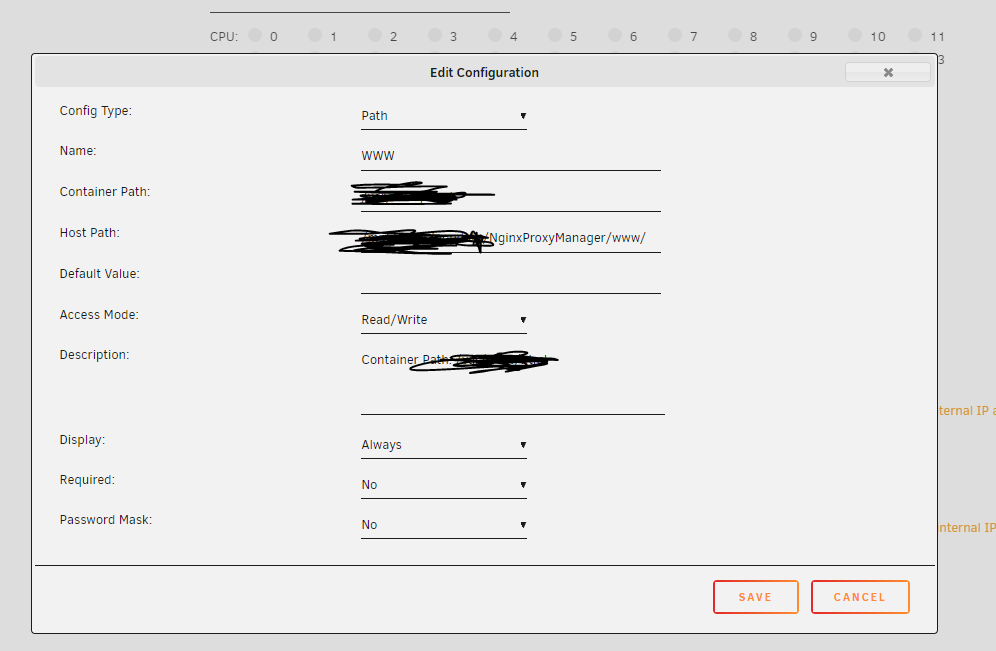
Mount Site Files in docker-compose.yml
Add a volume entry pointing to your site folder:
volumes: - ./data:/data - ./letsencrypt:/etc/letsencrypt - /opt/mysite:/opt/mysite:ro # read-only site files -
2
Set Forward to localhost:80
When creating the proxy host, set Forward to
127.0.0.1port80. This tells Nginx to serve from a location block, not a backend. -
3
Add Advanced Nginx Config
In the Advanced tab, paste the following, replacing the path with your actual site directory:
root /opt/mysite; index index.html; location / { try_files $uri /index.html; }
Force HTTPS redirect: Add this to the Advanced tab to ensure all HTTP traffic redirects to HTTPS:
Custom headers (security hardening):
Large file uploads (Plex, Nextcloud):
502 Bad Gateway: NPM can reach your host but not the service. Verify the backend container is running and the port is correct. If using container names, make sure NPM is on the same Docker network.
SSL cert issuance fails (DNS challenge): Double-check your Cloudflare API token permissions and that the domain zone matches. Check NPM container logs: docker logs npm 2>&1 | tail -50
HTTP-01 challenge fails (port 80 blocked): Switch to DNS-01 challenge via Cloudflare instead of HTTP challenge. Many ISPs block port 80 on residential connections.
Wildcard cert not working for root domain: When creating the cert, enter both *.yourdomain.com AND yourdomain.com in the same cert — wildcards don't cover the apex domain.
Categories / organization: NPM doesn't natively support folders for proxy hosts. With many domains it becomes unwieldy — a feature requested by the community. Workaround: use consistent naming conventions (service.domain.com vs. admin-service.domain.com).
- Nginx Proxy Manager Official Docs Official documentation and setup guide
- Video Guide for NGINX Proxy Manager Shared in HomeLab Discord #how-to-guides
- NPM GitHub — Static site hosting discussion Community issue with advanced config examples